
Group Ranking
Group Ranking is an interactive prioritization question type. Respondents drag items into groups (for example, High / Medium / Low) and can optionally rank items within each group.
What it looks like
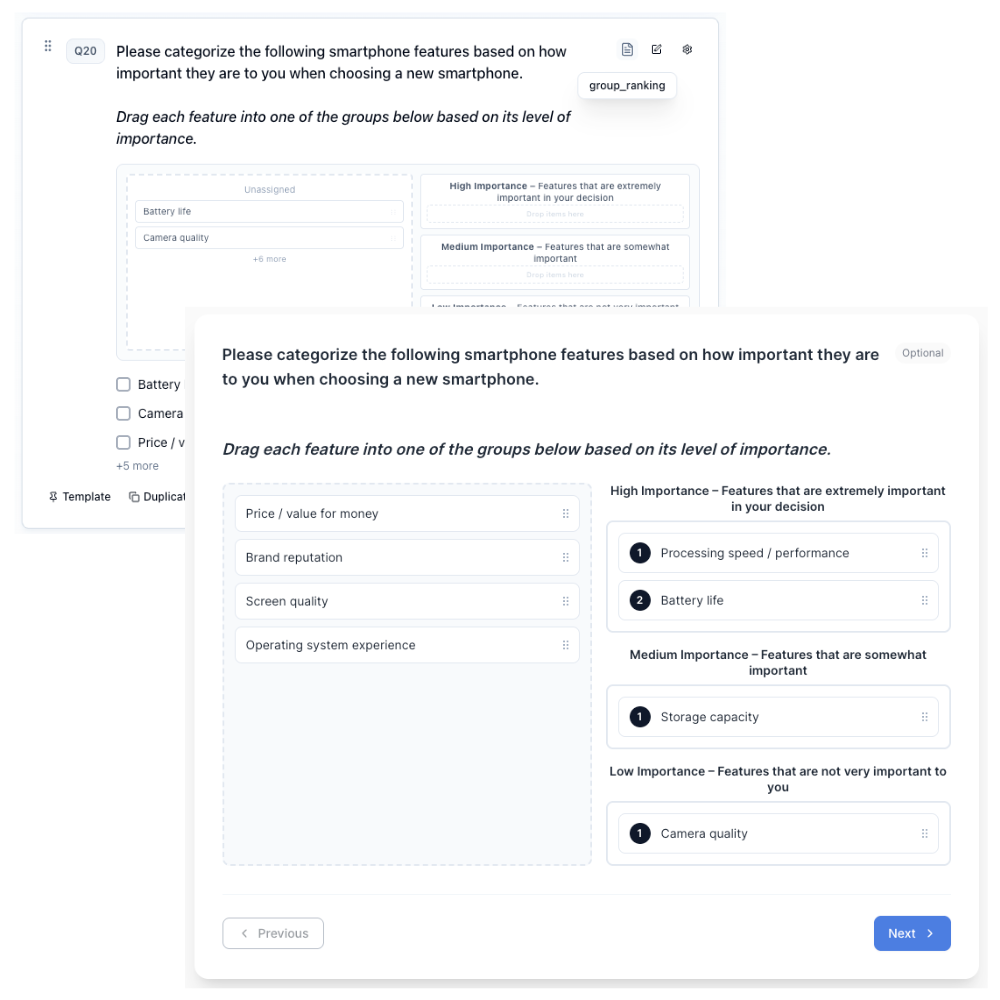
How to create
Open your survey in the Survey Builder.
Click Add Question and select Group Ranking.
Add the items you want respondents to sort and rank (these are the question options). Use Bulk edit for long lists; see Bulk Edit Choice Lists.
In Properties, configure Group Ranking Settings:
- Under Groups, edit group labels and use Add group to add more groups.
- Toggle Allow unassigned to show an unassigned pool for items not yet placed.
- Toggle Rank within groups to allow reordering items inside each group.
Preview and complete a full test run to confirm the interaction matches your intent.
Option display and hide controls
Hover an item in the canvas to set option visibility logic (branch icon) or Hide from respondents, the same way you would on other choice lists. See Option Properties.
Piping ranked items
Group Ranking answers can be piped elsewhere in the survey, the same way Rank Order answers can. From the Insert recall / piping menu on any question text or other rich text field, find this question and choose:
- All ranked items — the full ranking, flattened group by group in priority order (everything in the top group, then the next group, and so on), each group's items in the order the respondent sorted them.
- Rank #1, Rank #2, and so on — the item that landed in that overall position.
Items left in the unassigned pool are never part of the ranking, so they won't come up in either recall option. See Piping and Recall for more on inserting recall tokens.
Using rankings in logic
Group Ranking supports the same ranking operators as Rank Order in display, skip, and end-survey conditions: is ranked, is not ranked, is ranked in top, and is ranked in bottom. Quali-Fi flattens groups in group priority order (matching piping); unassigned items are excluded.
Best for
- Tiering items into priority bands (high / medium / low)
- Sorting exercises where a strict 1-to-N ranking is too rigid
- Workshops or stakeholder prioritization activities
Tips
- Keep the number of items manageable (for example, 8–15).
- Use clear group labels so respondents understand the meaning of each group.
- If you need a simple linear ranking, use Rank Order.